
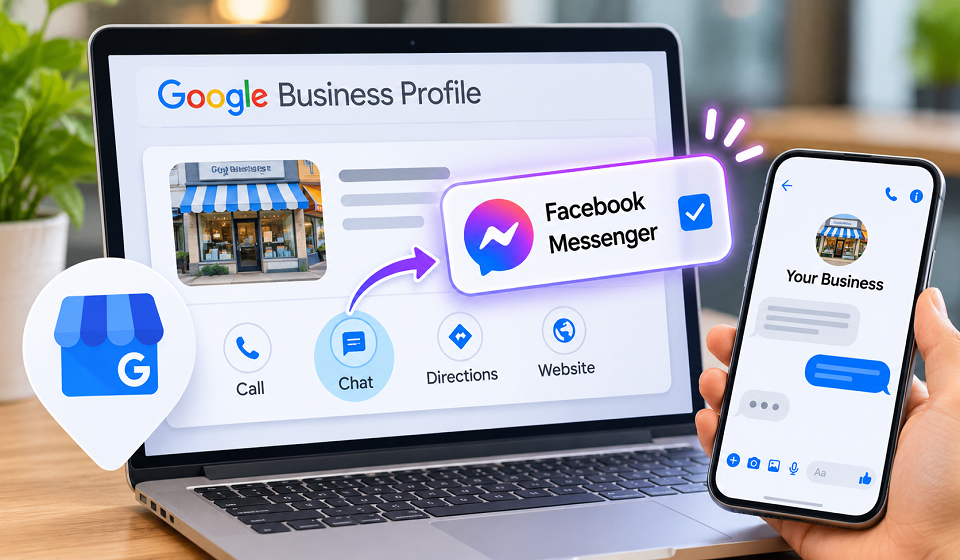

Google is introducing another way for businesses to communicate with customers through their local search listings. Facebook Messenger is now appearing as a chat option within Google Business Profile, allowing businesses to connect their Facebook Page messaging with their Google listing.
The update gives businesses another communication channel alongside existing messaging options such as WhatsApp and text messaging. Customers may be able to discover a business through Google Search or Maps and then contact it through Facebook Messenger.
The feature was initially reported after some businesses received emails about Messenger links being added to their profiles automatically. More recently, business owners have reportedly started seeing Messenger as a manually selectable option within their Google Business Profile settings.
Here’s what the update means, how businesses can use it and why it matters for local SEO and customer communication.
Google Business Profile Adds Facebook Messenger as a Chat Option
Facebook Messenger is now appearing under the Chat section of Google Business Profile for some businesses.
The option allows business owners to connect their Facebook Messenger account so customers can contact them through the messaging platform.
The feature was spotted by users who noticed Messenger appearing alongside other chat options while editing their Google Business Profile.
According to Search Engine Watch, the new option allows businesses to add Messenger, make it their primary chat option or remove it from their profile.
This gives businesses greater flexibility in choosing how customers communicate with them after discovering their listing through Google.
What Changed With Google Business Profile Messaging
The Messenger integration follows earlier reports that Google had been automatically adding Facebook Messenger links to some business profiles.
In October 2026, some business owners reportedly received emails informing them that Google had added Messenger links to their profiles.
These links use Meta’s Messenger link format, which directs customers to a conversation with the business’s Facebook Page.
The latest development allows some business owners to manually select Facebook Messenger from the Chat options when editing their profiles.
This means businesses may have more control over whether Messenger appears as a communication option and how they manage their chat preferences.
How Facebook Messenger Works With Google Business Profile
The integration is designed to connect customers discovering a business on Google with its Facebook Messenger inbox.
For example, a user searching for a local dentist, restaurant, mechanic, salon or other service provider may find the business through Google Search or Maps.
If Messenger is available as a contact option, the customer can potentially use the link to start a conversation through Facebook Messenger.
Messages are directed to the business’s Facebook Page messaging inbox rather than a traditional phone-based messaging channel.
This can be useful for businesses that already manage customer inquiries through Facebook and prefer to keep conversations within their existing communication workflow.
Businesses Can Choose Their Preferred Chat Option
The new Messenger option reportedly includes additional controls within Google Business Profile.
Businesses may see a three-dot menu next to the chat option with controls such as:
- Mark as primary to make Messenger the preferred chat option
- Remove to delete Messenger from the available chat options
These controls allow businesses to manage their communication preferences based on the messaging channels they actively use.
However, the exact availability and behaviour of these settings may vary as Google continues rolling out the feature.
How to Check Facebook Messenger in Google Business Profile
Businesses can check whether the Messenger option is available in their Google Business Profile settings.
Step 1
Open Google Search or Google Maps and access your verified Business Profile.
Step 2
Select the option to edit your profile.
Step 3
Open the Contact section.
Step 4
Look for the Chat options.
Step 5
Check whether Facebook Messenger appears as an available option.
If Messenger is available, businesses can add or manage the link according to the options shown in their profile.
Business owners should also verify that the Messenger link directs customers to the correct Facebook Page.
Why This Update Matters for Local Businesses
Adding Facebook Messenger to Google Business Profile could help businesses make customer communication more convenient.
Many customers prefer messaging rather than calling, particularly when asking about prices, availability, appointments, opening hours or services.
By offering Messenger through a Google listing, businesses may reduce the steps customers need to take to start a conversation.
More Convenient Customer Communication
Customers can potentially contact businesses through a messaging platform they already use.
Additional Lead Generation Opportunities
Businesses may receive inquiries from customers who discover them through Google Search or Maps but prefer messaging instead of calling.
Better Integration With Existing Facebook Workflows
Businesses already using Facebook Page inboxes may be able to manage Google-originated customer inquiries through their existing messaging setup.
More Communication Choices
The addition of Messenger gives businesses another option alongside WhatsApp and text messaging, where those options are available.
What This Means for Local SEO
Google Business Profile remains an important platform for local businesses seeking visibility in Google Search and Maps.
Adding more communication options may improve the customer experience by making it easier for potential customers to contact businesses after discovering their listings.
However, businesses should not assume that adding Facebook Messenger directly improves Google rankings.
Google has not announced that Messenger integration is a ranking factor.
The primary benefit is customer communication and potentially reducing friction between discovering a business and contacting it.
Businesses should focus on keeping their profiles accurate, maintaining relevant business information, responding to inquiries and providing a reliable customer experience.
Messenger Is Not Available to Every Business Yet
Although the feature has reportedly appeared in some Google Business Profiles, availability may vary.
Google’s official Business Profile messaging documentation has not yet fully reflected the Messenger option at the time of reporting.
This means businesses may not see Messenger in their Chat settings immediately.
The feature should therefore be treated as a reported rollout rather than a universally available feature for all Google Business Profiles.
Businesses should check their own profiles periodically for updates.
Should Businesses Add Facebook Messenger to Their Google Listing
Businesses should consider adding Messenger if they already use Facebook Page messaging to communicate with customers.
However, adding another chat option is only useful if someone is responsible for responding to incoming messages.
Before enabling Messenger, businesses should consider:
- Who will monitor the Facebook Page inbox?
- How quickly can customer inquiries be answered?
- Is the Facebook Page linked to the correct business?
- Are customer inquiries being tracked?
- Does the business already have a preferred communication channel?
If the business cannot actively manage Messenger, adding the option may create unanswered inquiries and a poor customer experience.
Final Thoughts
Google Business Profile’s reported addition of Facebook Messenger is a small but useful development for businesses that rely on local search visibility and online customer communication.
The integration could make it easier for customers to move from discovering a business on Google to contacting it through Facebook Messenger.
For businesses already managing customer conversations through Facebook, the feature may provide another convenient way to connect with potential customers.
However, availability is still evolving, and Google’s official documentation has not fully confirmed the feature at the time of reporting.
Businesses should check their Google Business Profile settings, verify any Messenger links and ensure that incoming customer messages are monitored.
As Google continues expanding communication options across Search and Maps, businesses may have more opportunities to connect with customers directly from their local listings.