

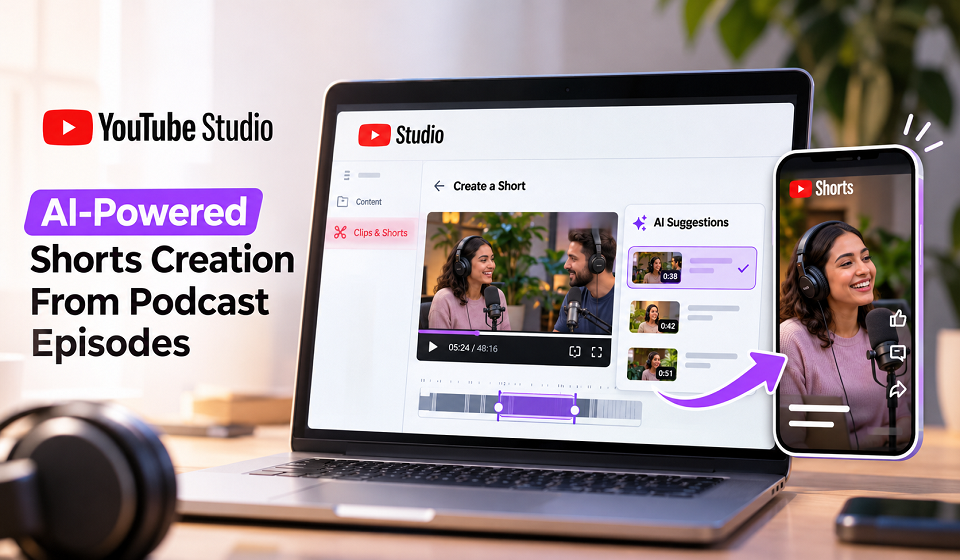

YouTube is making it easier for podcast creators and video publishers to turn long-form content into short-form videos. The platform has expanded its Clips tool in YouTube Studio, allowing creators to extract interesting moments from existing videos and convert them into vertical YouTube Shorts.
The update combines manual editing options with AI-powered suggestions, transcript-based selection and automatic captions. It is designed to help creators reuse their existing content without having to start the editing process from scratch or rely on separate editing software.
Announced by TeamYouTube on November 12, 2026, the update is particularly relevant to creators who regularly publish podcasts, interviews, webinars and other long-form videos.
What Is YouTube’s New AI-Powered Shorts Creation Feature?
YouTube’s updated Clips and Shorts tool allows creators to select sections of an existing long-form video and turn them into separate Shorts directly inside YouTube Studio.
Previously, creators who wanted to promote a podcast through short videos often had to identify interesting moments, edit them into vertical formats and upload them separately. The expanded Studio workflow brings several of these steps into one place.
Creators can choose video segments manually or use AI-powered suggestions, where available, to identify moments that may work as standalone Shorts.
YouTube’s AI-generated outline also helps creators navigate the video’s transcript and locate relevant sections more easily.
The important distinction is that AI suggestions assist with content selection. Creators can review and edit the suggested moments before creating their Shorts.
How Does the New Shorts Creation Tool Work?
The updated feature is available through YouTube Studio. Creators can follow these steps to create a Short from an existing video:
- Open YouTube Studio and go to the Content section.
- Select the existing long-form video they want to use.
- Open the Clips and Shorts option from the left-hand menu.
- Choose the option to create a Short.
- Select the video segment using the transcript or timeline editor, or choose an AI-powered suggestion if available.
- Preview the selected segment and make any necessary adjustments.
- Select Create Draft and complete the standard upload process.
Creators have control over the selected section. They can adjust the start and end points through the transcript or video timeline, rather than having to accept an AI suggestion without changes.
This gives podcast teams more flexibility when selecting clips for different audiences and platforms.
AI-Powered Suggestions Identify Interesting Moments
One of the most notable parts of this update is the AI-powered suggestion system.
Instead of manually watching an entire podcast episode to find suitable clips, eligible creators can use suggestions displayed in the left panel of the Studio editor.
YouTube’s system identifies moments from an episode that can be watched independently. It also generates an outline based on the video’s transcript, helping creators navigate the content and find potential highlights.
Creators can review these suggestions and edit the selected portions before creating a Short.
This can be particularly useful for:
- Podcast discussions with several interesting topics.
- Interviews featuring useful answers or opinions.
- Educational videos containing individual lessons.
- Webinars with practical tips and explanations.
- Long-form conversations that can be divided into focused clips.
However, AI-generated suggestions do not guarantee that every selected moment will perform well. Creators should still check whether a clip makes sense without the surrounding conversation.
Automatic Vertical Formatting and Captions
Another important part of the update is the automatic conversion of widescreen videos into vertical Shorts.
A traditional podcast episode is often recorded in a horizontal 16:9 format. YouTube’s tool transforms the selected segment into a vertical presentation while keeping the important parts of the video within the frame.
This reduces the need for creators to manually build a vertical version of every selected clip.
The tool also supports automatically generated captions where available. Creators can customise:
- Caption colour
- Font
- Text styling
- Caption position
They can also turn off automatic captions if they prefer another editing approach.
Before creating the Short, users can preview the result and make adjustments. The finished video can then be saved as a draft before completing the publishing process.
Shorts Automatically Link Back to the Original Video
The update also provides a useful connection between short-form and long-form content.
When creators make a Short through this Studio tool, YouTube automatically adds the original video as a related video. Viewers can find a clickable link underneath the channel handle and use it to access the full episode.
This feature can help podcast creators direct viewers from a short highlight to the complete discussion.
There are some exceptions. YouTube does not automatically add the related-video link when the Short is:
- Private
- Unlisted
- Made for Kids
For clips created through the separate video clip option, YouTube recommends adding a link to the original video in the description.
Which Countries and Languages Support AI Suggestions?
YouTube’s AI-powered suggestions and outlines are currently available to creators in selected countries and languages.
Supported countries:
- Brazil
- Canada
- France
- Germany
- India
- Mexico
- South Korea
- Spain
- United Kingdom
- United States
Supported languages:
- English
- French
- German
- Hindi
- Korean
- Portuguese
- Spanish
India is included in the supported-country list, and Hindi is among the supported languages.
Availability is still limited. YouTube has said it is working to expand AI suggestions to more creators, but it has not provided a confirmed rollout schedule or a list of additional countries and languages.
Will Creators Be Penalised for Turning Their Own Videos Into Shorts?
Content reuse and originality are important considerations for YouTube creators, particularly as the platform continues to address repetitive and low-value content.
YouTube’s official help documentation states that creators will not be penalised simply for using their own content in a video clip or Short.
This clarification is relevant to podcast creators who want to repurpose their existing episodes into shorter videos.
However, it should not be interpreted as a guarantee that every reused video will receive recommendations or qualify for monetisation. YouTube’s broader channel monetisation and reused-content policies still apply.
Creators should focus on producing useful clips that offer context and value rather than uploading large numbers of repetitive or incomplete excerpts.
How This Update Could Benefit Podcast Creators
The expanded Shorts workflow could make content repurposing more practical for creators who already produce long-form videos.
1. Less manual editing
AI-powered suggestions and transcript selection can help creators find relevant moments without reviewing every second of an episode manually.
2. More opportunities to reach viewers
Shorts provide another format through which audiences can discover a podcast, interview or educational video.
3. Easier content distribution
Creators can use selected moments from a single episode to develop multiple short-form pieces of content.
4. Better connection with full episodes
The automatic related-video link gives viewers a direct route from a Short to its original long-form video, subject to YouTube’s stated exceptions.
5. A simpler production workflow
Vertical formatting, captions and draft creation are integrated into YouTube Studio, reducing the need to move between multiple tools for these tasks.
These benefits may help creators make better use of their existing video libraries. Actual audience growth will still depend on content quality, viewer interest and how effectively each clip communicates its message.
What Creators Should Keep in Mind
Although the new feature can simplify video editing, creators should not depend entirely on automated suggestions.
A good Short needs to communicate a complete idea within a limited amount of time. A sentence taken out of context may not make sense to viewers who have not watched the full episode.
Before publishing, creators should check:
- Whether the selected moment has a clear beginning and ending.
- Whether the vertical crop keeps the speaker or important visual elements visible.
- Whether captions are accurate and easy to read.
- Whether the clip provides enough context to stand independently.
- Whether the related-video link directs viewers to the correct full episode.
Creators outside the supported country and language lists should also check YouTube’s current availability information before planning a workflow around AI suggestions.
Final Thoughts
YouTube’s expanded Clips and Shorts tool is a practical update for podcast creators and publishers who want to reuse their long-form videos more efficiently.
By combining AI-powered suggestions, transcript-based selection, vertical formatting and automatic captions, YouTube is bringing more of the Shorts creation process directly into Studio.
The automatic link to the original episode is another useful addition, giving viewers a straightforward way to move from a short highlight to the complete video.
The feature does not eliminate the need for editing decisions or guarantee higher views. However, it can reduce some of the work involved in identifying and preparing short-form content.
For podcast creators, educators and video publishers, this update offers another way to get more value from videos they have already produced.