

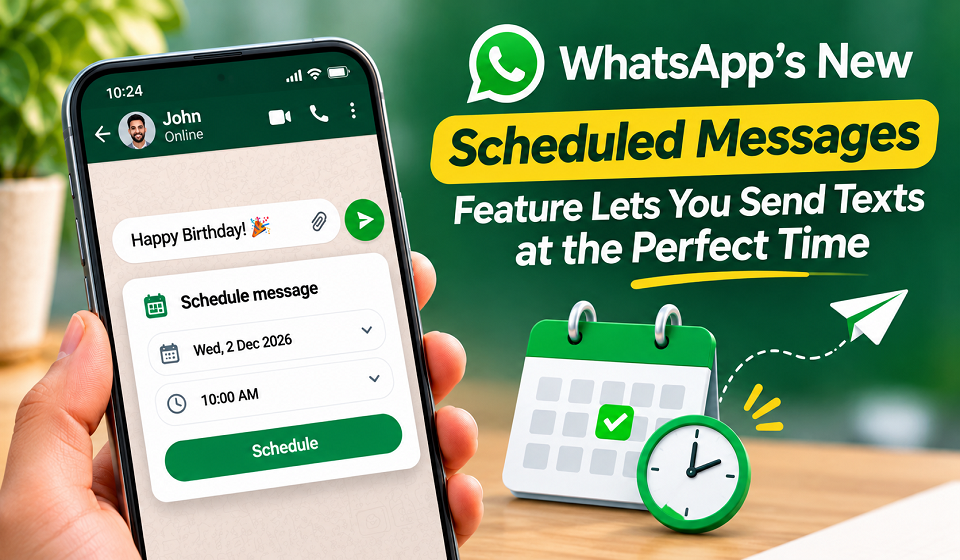

WhatsApp has introduced one of its most requested features, allowing users to schedule messages for delivery at a specific date and time. The new feature makes it possible to write a message in advance and have it automatically sent later, eliminating the need to remember to send it manually.
The feature supports individual and group chats and allows users to schedule messages between 10 minutes and 14 days in advance. It also works with text, photos and videos, giving users more flexibility when planning their communication.
The update is particularly useful for birthday wishes, reminders, work messages, important announcements and conversations across different time zones. WhatsApp says scheduled messages will be delivered even if the sender’s phone is switched off or its battery runs out.
Here’s everything you need to know about WhatsApp’s new scheduled messaging feature, how it works and how users can take advantage of it.
WhatsApp Finally Introduces Scheduled Messages
WhatsApp has officially announced scheduled messages, a feature that users have been requesting for years.
Previously, users who wanted to send a message at a specific time often had to rely on reminders, third-party tools or manually opening WhatsApp when the time arrived.
The new feature allows users to prepare messages whenever they think of them and choose when those messages should be delivered.
For example, someone remembering a friend’s birthday late at night can write the greeting in advance and schedule it to arrive at midnight. Similarly, users can prepare reminders or important messages during the day and have them delivered at a more appropriate time.
The feature is designed to make communication easier by allowing users to plan messages without needing to be available when they are sent.
How Far in Advance Can You Schedule WhatsApp Messages?
WhatsApp allows users to schedule messages within a specific time window.
Users can schedule messages:
- Minimum: 10 minutes in advance
- Maximum: 14 days in advance
This gives users enough flexibility to schedule short-term reminders as well as messages for birthdays, anniversaries, appointments and other events occurring within the next two weeks.
Messages can be scheduled for a specific date and time, allowing users to plan their communication around their intended delivery moment.
Scheduled Messages Work in Individual and Group Chats
The new feature is available for both one-to-one conversations and group chats.
Users can schedule a message for a particular contact or prepare an announcement for a group and have it delivered at the selected time.
This could be useful for:
- Birthday wishes
- Exam good-luck messages
- Meeting reminders
- Event announcements
- Family updates
- Group coordination
- Work-related communication
Scheduling messages in group chats can help users share important information at the right time without needing to remember to send it manually.
WhatsApp Supports Text Photos and Videos in Scheduled Messages
The feature is not limited to plain text.
WhatsApp allows users to schedule messages containing:
- Text
- Photos
- Videos
This means users can plan media sharing in advance as well as ordinary text messages.
For example, users may schedule a birthday photo, an event announcement with an image or a video message to be delivered at a specific time.
The supported media options make the feature more flexible for everyday personal communication.
How to Schedule a Message on WhatsApp
Scheduling a message is designed to be simple and does not require users to navigate through complicated settings.
Step 1 Open WhatsApp
Open WhatsApp and select the individual chat or group where you want to send the scheduled message.
Step 2 Write Your Message
Type the message you want to send. You can also attach a supported photo or video.
Step 3 Press and Hold the Send Button
Instead of tapping the Send button normally, press and hold it to access the scheduling option.
Step 4 Select the Date and Time
Choose when you want the message to be delivered.
You can select a delivery time between 10 minutes and 14 days from the time you schedule it.
Step 5 Confirm the Schedule
Confirm your selected date and time. The message will then be queued for automatic delivery.
Once scheduled, WhatsApp will send the message at the chosen time.
Can You View or Delete Scheduled Messages?
Yes. WhatsApp allows users to view messages they have scheduled for future delivery.
Users can review their upcoming scheduled messages and delete them before they are sent if their plans change.
This is useful when a message is no longer required, the information changes or the user decides not to send it.
However, WhatsApp’s announcement specifically confirms viewing and deleting scheduled messages. Users should not assume that editing an already scheduled message or changing its delivery time is supported unless that option appears in their app.
Scheduled Messages Will Send Even If Your Phone Is Off
One of the most useful aspects of WhatsApp’s scheduled messaging feature is that the sender’s phone does not need to be switched on at the delivery time.
According to WhatsApp, scheduled messages will still arrive at the selected time even if the sender’s device is switched off or its battery has run out.
This removes the need to keep the phone powered on simply to ensure that a scheduled message is delivered.
It can be particularly helpful when users schedule messages for late-night or early-morning delivery, when they may not be actively using their devices.
WhatsApp Scheduled Messages Remain End-to-End Encrypted
WhatsApp says scheduled messages retain the same end-to-end encryption as its personal messages.
This means the messages remain protected so that only the intended conversation participants can read their contents.
According to WhatsApp, even the company cannot read these encrypted messages.
The encryption protection applies to scheduled messages just as it does to ordinary personal conversations, helping maintain privacy while messages are prepared for future delivery.
Why WhatsApp Scheduled Messages Could Be Useful
The new feature has several practical uses beyond birthday greetings.
Birthday and Anniversary Wishes
Users can schedule greetings in advance to ensure they arrive at the right time, even if the sender is sleeping or busy.
Work and Meeting Reminders
Messages about meetings, deadlines, appointments and important tasks can be prepared in advance and delivered when required.
Different Time Zones
Users communicating with friends, family or colleagues in other countries can schedule messages according to the recipient’s convenient time.
Group Announcements
Group administrators and members can prepare announcements, reminders or updates and schedule them to arrive at a specific time.
Personal Organisation
The feature can help users avoid forgetting important messages by allowing them to write the message when they remember it rather than waiting until the delivery time.
WhatsApp Is Catching Up With Other Messaging Apps
Message scheduling is not entirely new in the messaging industry.
Platforms such as Telegram and Signal have offered scheduled messaging capabilities for some time. Apple’s Messages app also supports its Send Later feature on compatible devices.
WhatsApp’s introduction of scheduled messages brings the platform closer to offering a capability already available in several competing messaging services.
Given WhatsApp’s enormous user base, the addition could make message scheduling accessible to a much larger number of people who previously had to rely on alternative tools.
When Will WhatsApp Scheduled Messages Be Available?
WhatsApp has announced a global rollout of the feature over the coming weeks.
This means users may not immediately see the scheduling option in their app, even if the feature has been officially announced.
Availability may depend on the rollout reaching the user’s account and app version.
Users should keep WhatsApp updated through the Google Play Store or Apple App Store and check whether the scheduling option appears when they press and hold the Send button.
The gradual rollout means the feature may become available at different times for different users.
Final Thoughts
WhatsApp’s scheduled messaging feature is a practical addition that makes everyday communication more convenient.
Users can now write messages when they think of them and choose when they should arrive, whether they are sending birthday wishes, reminders, work updates or messages to people living in different time zones.
With support for text, photos and videos, individual and group chats, a scheduling window of up to 14 days and delivery even when the sender’s phone is switched off, the feature addresses a common limitation of messaging apps.
Although WhatsApp is introducing the feature later than some competing platforms, its availability within one of the world’s most widely used messaging apps could make scheduled communication much more accessible.
As the global rollout continues, users can look forward to a simpler way of ensuring their messages arrive at exactly the right time.