
Google Launches Gemini Decisions API for Faster AI-Powered Classification and Decision-Making

Google has introduced a new artificial intelligence tool designed to make structured decisions faster and more efficiently. Called the Gemini Decisions API, the new developer interface is powered by Google’s Gemini Decision 1 model and focuses on classification, evaluation and decision-making rather than traditional text generation.
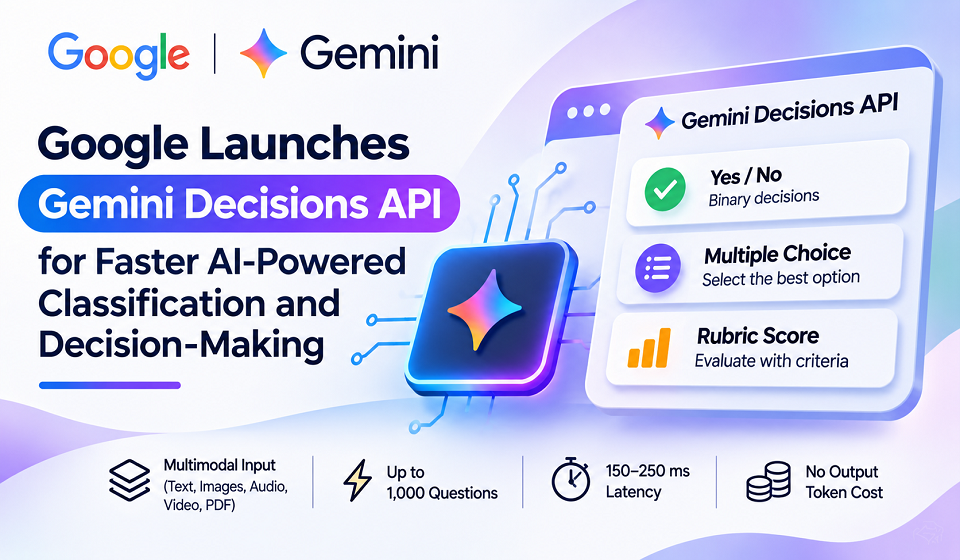
Announced on November 11, 2026, the API allows developers to evaluate up to 1,000 independent questions against a shared input in a single request. It supports text, images, audio, video and PDF documents, making it suitable for applications that need to analyse different types of information.
Unlike conventional generative AI models that produce responses token by token, Gemini Decision 1 evaluates predefined options and returns probabilities and confidence scores.
Google says the approach can help developers build faster and more cost-effective systems for tasks such as content moderation, AI model routing, policy checks and automated quality assessment.
What Is Google’s Gemini Decisions API?
The Gemini Decisions API is a new endpoint within Google’s Gemini API ecosystem, powered by the Gemini Decision 1 model (gemini-decision-1).
It is designed for applications that need an AI system to make decisions from a predefined set of options.
For example, a customer support application may need to determine whether a message is related to billing, technical support or account access. Instead of asking a general-purpose chatbot to generate an explanation and then extracting a category from its response, developers can directly ask the Decisions API to select the most appropriate option.
The API returns structured results, including probabilities and confidence scores, which developers can use in their applications.
Google describes this approach as closed-set decision-making. The possible answers are defined in advance, allowing the model to evaluate the available choices instead of generating an unrestricted response.
The main capabilities include:
- Evaluating up to 1,000 independent questions in one request.
- Processing text, images, audio, video and PDF documents.
- Supporting yes/no, multiple-choice and rubric-based scoring.
- Returning probabilities and confidence scores.
- Evaluating multiple questions against one shared input.
- Making decisions without generating conventional output text.
The API is available through the Gemini API in Google AI Studio. <Cite refs={[“turn130163search0”]}/>
How Does Gemini Decision 1 Work?
Traditional generative AI models usually create responses one token at a time. This approach works well for writing, summarising, coding and conversational tasks.
However, many business applications do not need a detailed written response. They need a specific decision, classification or score.
Gemini Decision 1 uses a different approach.
Developers provide an input, define the questions they want answered and specify the possible choices or evaluation criteria. The model then evaluates the shared input against those questions in a single forward pass.
For example, consider an application that receives a photograph of a damaged delivery package.
The developer could ask the API:
- Is the package visibly damaged?
- Which type of damage is present?
- How severe is the damage?
- Should the package be sent for manual inspection?
The API can evaluate these questions against the same image and return structured results.
This approach can reduce the need for multiple separate model calls when an application needs to make several related decisions about the same information.
Google says Gemini Decision 1 can evaluate up to 1,000 independent questions in one request, with each answer including a confidence score between 0 and 1. <Cite refs={[“turn130163search0”]}/>
Three Main Decision Types Supported by the API
The Gemini Decisions API supports three structured question types. Each is designed for a different kind of evaluation.
1. Yes/No Decisions (noul)
The noul decision type evaluates whether a particular statement or condition is true or false.
It returns the probability associated with the possible outcomes.
For example, an e-commerce application could ask:
- Is the uploaded product image blurry?
- Does the customer message contain a refund request?
- Is the document missing a required signature?
- Does the image show visible product damage?
This can be useful for binary classification, policy checks and automated quality control.
2. Multiple-Choice Decisions (choice)
The choice decision type selects the most appropriate option from a predefined list.
Developers can provide between 2 and 255 possible choices. The API returns the selected option along with normalised probabilities for the available candidates.
For example, a customer support system could classify incoming messages into categories such as:
- Billing issue.
- Technical support.
- Account access.
- Product information.
- Refund request.
The application can then use the selected category to route the request to the appropriate department or automated workflow.
3. Rubric-Based Scoring (score)
The score decision type evaluates information against an ordered set of criteria.
Instead of selecting only a yes/no answer or one category, the model assigns a score based on the supplied rubric.
For example, a business could evaluate a customer service interaction using criteria such as:
- Level 0: The issue was not resolved.
- Level 1: The issue was partially resolved.
- Level 2: The issue was fully resolved.
The API returns a continuous weighted score along with probabilities for the different rubric levels.
This can be useful for quality assessment, content grading and structured evaluation.
Multimodal Capabilities: Text, Images, Audio, Video and PDFs
One of the important features of Gemini Decision 1 is its ability to process different types of information through a shared input.
The API supports five main input formats:
| Input format | Possible applications |
|---|---|
| Text | Classifying messages, checking policies and evaluating written content |
| Images | Product inspection, visual quality checks and document analysis |
| Audio | Analysing call recordings and evaluating spoken interactions |
| Video | Reviewing visual events and identifying relevant content |
| PDFs | Processing forms, invoices, reports and claims |
Developers can combine multiple formats in one request.
For example, an insurance application could provide a scanned claim document together with photographs of damaged property. The API could evaluate whether the documents contain required information, identify the type of damage and assess its severity.
Similarly, a customer service platform could combine a call recording with account information to evaluate the interaction.
Google says the API supports shared inputs with context windows of up to 256K tokens. Developers can also adjust image and video resolution to manage visual detail and token usage. <Cite refs={[“turn130163search0”]}/>
Gemini Decisions API Performance and Speed
Google is positioning Gemini Decision 1 as a low-latency model for applications that need structured results quickly.
According to the company’s announcement, the model delivers:
- Approximately 50–100 milliseconds of median model-compute time.
- Around 150–250 milliseconds of end-to-end latency.
- Nearly flat latency when increasing the number of questions from 1 to 100 per request under the described test conditions.
These figures are Google’s reported performance results, not independent guarantees for every application or workload.
The distinction matters because actual response times can vary depending on input size, network conditions, modality and application requirements.
Google also reports that the model achieved the lowest calibration error across the benchmark suite used in its comparisons, which included agent routing, reasoning, ranking and multimodal understanding.
These benchmark findings should be understood as Google’s own reported comparisons rather than independent proof that the model will outperform every alternative in real-world applications. <Cite refs={[“turn130163search0”]}/>
Gemini Decisions API Pricing and Availability
Google has introduced a pricing structure that charges for input tokens but does not charge for output tokens.
Gemini Decision 1 API Pricing
| Pricing Component | Cost / Details |
|---|---|
| Input tokens | $0.10 per 1 million tokens |
| Output tokens | No charge |
| Shared input across multiple questions | Billed once per request |
| Question instructions and criteria | Counted towards input token usage |
| API prototyping | No-cost tier available, subject to usage limits |
Google’s pricing model allows developers to evaluate multiple questions against the same input without paying separately for repeated copies of that shared input.
However, each question’s instructions and evaluation criteria still contribute to input token usage.
Google also states that there are no output-token charges, variable thinking-token bills or separate audio transcription and OCR costs for this API.
Availability
Developers can access Gemini Decision 1 through the Gemini API in Google AI Studio. Google provides integration guides for:
- Python
- JavaScript
- REST API
A no-cost API tier is available for prototyping, subject to applicable usage limits.
How Google Is Already Using the Decisions API
Google says several of its own products are already using the Gemini Decisions API for different tasks.
These examples demonstrate how structured AI decisions can support applications beyond conventional chatbot conversations.
1. Gemini Notebook: Intelligent Model Routing
Gemini Notebook uses the Decisions API to determine which model tier and thinking level should handle an incoming request.
The system classifies the user’s intent and routes everyday questions to an appropriate model while reserving more advanced reasoning models for complex tasks.
Google reports that this approach can reduce latency for everyday queries by up to 40%.
2. Stitch: Faster Design Iteration
Google’s Stitch product uses the Decisions API in its rapid canvas experiment.
The system helps generate product-flow wireframes and apply edits made through voice or touch interactions.
This allows designers to make changes quickly before moving into the full Stitch experience for more detailed design work.
3. CC from Google Labs: Emoji Selection
CC from Google Labs uses the API to select suitable emoji reactions from a collection of more than 200 options.
Rather than generating a lengthy response, the model selects the most appropriate option based on the available context.
4. Google Search: Safety Checks
Google also says it uses the Decisions API as a safety layer for tools in Search.
The system helps identify adversarial behaviour and content that may violate defined safety requirements.
These examples show how Google is using structured decision-making to support model routing, interactive design, content evaluation and application safety. <Cite refs={[“turn130163search0”]}/>
Practical Applications of Gemini Decision 1 for Businesses
Beyond Google’s own products, the API could support several types of business applications.
1. Automated Content Moderation
Platforms can evaluate submitted text, images and other content against predefined policies.
For example, a moderation system could check whether a post contains prohibited material and route uncertain cases for human review.
2. Customer Support Automation
Businesses can classify incoming customer messages and direct them to the correct support team.
A message about a payment failure could be routed to billing, while a login problem could be sent to account support.
3. Document and Invoice Processing
Financial and administrative applications can evaluate invoices, forms and scanned documents.
The API could help identify missing fields, classify document types and flag information that requires additional review.
4. E-commerce Product Inspection
Online retailers can use image-based evaluations to identify visible product damage, check image quality or classify product conditions.
This could help streamline quality-control workflows, although important decisions may still require human verification.
5. AI Agent Model and Tool Selection
AI agents often need to decide which model, tool or action should handle a particular request.
The Decisions API can evaluate predefined options and help select the most suitable next step.
This can make agent workflows more structured and reduce the need to generate and interpret lengthy text for simple routing decisions.
How Is Gemini Decision 1 Different From Traditional Generative AI Models?
The main difference is the type of task each model is designed to handle.
Traditional generative AI models are built to create new content, including written responses, summaries, code and explanations.
Gemini Decision 1 is designed to evaluate predefined options and return structured decisions.
| Feature | Traditional generative AI | Gemini Decision 1 |
|---|---|---|
| Main purpose | Generate content and responses | Evaluate predefined options |
| Output | Generated text or other content | Probabilities, choices and scores |
| Decision types | Often implemented through prompts | Native yes/no, choice and rubric scoring |
| Multimodal input | Depends on the model | Text, images, audio, video and PDFs |
| Output-token billing | Depends on the model and API | No output-token charge |
| Typical use | Writing, coding and conversation | Classification, routing and evaluation |
This does not mean Gemini Decision 1 replaces general-purpose Gemini models.
The two approaches serve different purposes. Developers can use generative models when an application needs original content and use the Decisions API when it needs a structured decision from a defined set of possibilities.
What Developers Should Consider Before Using the API
Although the Gemini Decisions API offers useful capabilities, developers should evaluate whether it fits their specific application.
Here are some important considerations:
Define clear decision criteria: The API works with predefined questions and options. Vague instructions or overlapping choices can make results harder to interpret.
Set confidence thresholds: Applications should decide what confidence level is acceptable before automatically acting on a result.
Use human review where necessary: Important or uncertain decisions should be routed to a human reviewer rather than relying entirely on an AI-generated score.
Evaluate performance with real data: Google’s published latency and benchmark results may differ from performance in a developer’s own environment.
Consider input costs: Although output tokens are free, input tokens, instructions and criteria still contribute to billing.
Protect sensitive information: Applications processing customer documents, recordings or personal information should follow appropriate privacy, security and data-handling requirements.
These considerations are especially important when using AI decisions in financial, legal, healthcare or other high-impact workflows.
What Happens Next?
Google has made Gemini Decision 1 available through the Gemini API and Google AI Studio, allowing developers to begin experimenting with the new decision-making capabilities.
The company is also expanding ecosystem integrations.
Google says support is rolling out across platforms and frameworks including:
- OpenRouter
- LangChain
- Vercel
- LiteLLM
- Pydantic AI
- Pipecat
- LiveKit
- OpenCode
The google-genai SDKs are also part of the developer experience. Google says support through Gemini in Google Cloud is coming soon.
As these integrations become available, developers may find it easier to add structured decision-making to existing AI applications without building every classification or routing component from scratch. <Cite refs={[“turn130163search0”]}/>
Conclusion
Google’s launch of the Gemini Decisions API introduces a specialised approach to AI-powered classification and decision-making.
Powered by Gemini Decision 1, the API can evaluate up to 1,000 questions against a shared multimodal input and return structured probabilities and confidence scores. Its three decision types support yes/no checks, multiple-choice selection and rubric-based scoring.
The ability to process text, images, audio, video and PDFs makes the API relevant to a wide range of applications, including content moderation, customer support, document processing and AI agent workflows.
For developers, the most important difference is that Gemini Decision 1 is not designed to replace conversational AI. It addresses a different requirement: making fast, structured decisions without generating lengthy responses.
As Google expands integrations and more developers experiment with the API, specialised decision models could become an important component of future AI-powered applications.